Kamis, 30 April 2020
Google Meet sudah 16 Peserta Teleconference
Jumat, 17 April 2020
Microsoft Teams Tambah Kapasitas Peserta Meeting Online
Microsoft Teams merupakan bagian dari ekosistem Office 365. Teams adalah layanan untuk aktivitas pekerjaan jarak jauh.
Source : https://amp-kompas-com.cdn.ampproject.org/v/s/amp.kompas.com/tekno/read/2020/04/15/18160017/microsoft-tambah-kapasitas-peserta-meeting-online-di-teams?usqp=mq331AQFKAGwASA%3D&_js_v=0.1#referrer=https%3A%2F%2Fwww.google.com&_tf=From%20%251%24s
Perbedaan Zoom Meeting dengan Zoom Room

Zoom adalah layanan konferensi video berbasiskan cloud. Aplikasi ini mengizinkan kamu untuk bertemu dengan orang lain secara virtual, entah itu dengan panggilan video, suara, atau keduanya. Menariknya, semua percakapan via Zoom bisa direkam untuk dilihat lagi nantinya.
Saat membicarakan Zoom, ada dua istilah umum yang bakal sering kamu dengar, yakni Zoom Meeting dan Zoom Room.
Zoom Meeting adalah pertemuan (meeting) menggunakan aplikasi Zoom. Kamu bisa bergabung dengan meeting tersebut dengan menggunakan webcam atau telepon.
Berikut tipe - tipe plan and pricing Zoom :
Zoom Free : Gratis. Kamu bisa mengadakan meeting one-on-one secara tidak terbatas, alias tanpa ada batasan waktu. Group meeting dengan banyak partisipan (100 orang) dibatasi hingga 40 menit. Meeting melalui Zoom Free ini juga tidak bisa direkam. Paket ini cocok bagi kamu yang baru mau merasakan fitur-fitur Zoom sebelum memutuskan untuk berlangganan.
Video Conference / Teleconference kamu tidak putus jika kamu connect ke ID Host yang berbayar. dikarenakan kamu menggunakan ID Host yang berbayar.
Zoom Pro : Biayanya USD 15 per host. Dalam artian, host bisa mengundah orang untuk ikut meeting. Peserta meeting bisa saja gratis, alias hanya host-nya saja yang membayar. Kamu bisa merekam meeting, tetapi waktu meeting terbatas 24 jam saja. Bisa memuat partisipan rapat hingga 100 orang.
Zoom Busines : Biayar USD 20 per host. Diharuskan membeli langganan 10 host alias USD 200. Menawarkan meeting hingga 300 orang dalam sekali waktu. Menawarkan cloud transcript dan layanan call center ke pihak Zoom secara dedicated. Kamu juga akan mendapatkan semua layanan Zoom Pro.
Zoom Business Enterprise : Biaya USD 20 per host dengan jumlah host minimal mencapai 100 akun alias USD 2.000. Layanan ini ditujukan untuk perusahaan dengan karyawan lebih dari 1.000 orang. Selain itu, ada tawaran menyimpan rekaman meeting secara tidak terbatas.
Dan kamu dapat mengintergrasikan ke ruangan meeting yang dapat disesuaikan tipe ConferenceCam Logitech. kamu dapat menggunakan notebook atau PC. berikut line up Logitech ConferenceCam sebagai berikut :
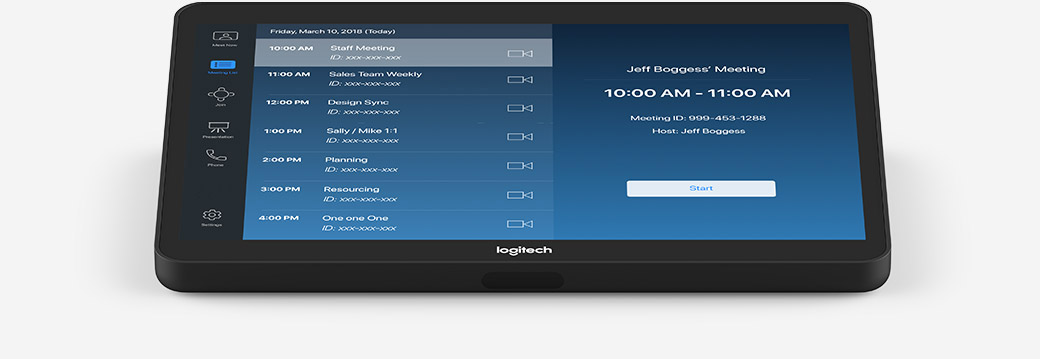
Berikut gambar dibawah ini merupakan Logitech TAP untuk digunakan Zoom Room.

Penggunakan remote untuk navigasi camera dapat di gunakan menggunakan Logitech TAP tersebut. Logitech membuat line up untuk ruangan meeting dari ruangan meeting kecil, sedang, dan besar.
Minggu, 15 Maret 2020
Logitech and Lenovo Team Up to Deliver Enterprise-Ready Meeting Room Solutions
At Logitech, we always look for ways to enable IT-friendly solutions that help enterprises bring seamless collaboration experiences to the workplace. Since launching Logitech Tap last summer, customers have told us that Tap has eased video conferencing pain points by providing simple, one-touch video and control on major collaboration platforms including Microsoft Teams Rooms and Zoom Rooms.
Now, we’re taking that a step further by offering an additional compute platform to enhance manageability, security, and support for your meeting rooms—the Lenovo ThinkSmart Edition M920 Tiny computing PC. Enterprise customers will now be able to purchase the Tap base model featuring the ThinkSmart Tiny pre-configured with Microsoft Teams Rooms or Zoom Rooms software, for an enterprise-grade conferencing solution fit for any sized collaboration room.
Thanks to a compact design, both Logitech Tap and ThinkSmart Edition Tiny seamlessly integrate into meeting spaces, enhancing installation and the management experience. And with compatibility with Microsoft Teams Rooms, as well as Zoom Rooms, it’s easier than ever before to deliver functions like one-touch start, adding new invitees, and content sharing for more efficient meetings.
“ThinkSmart Edition Tiny is the ideal compute foundation for Logitech Tap, delivering an optimal meeting experience in small, medium and large rooms,” said Joseph Mingori, general manager, Lenovo Smart Office Business. “We worked closely with Logitech to build a joint compute solution with powerful processing and platform stability. ThinkSmart Edition Tiny will only enhance what Logitech Tap offers in simplifying business collaboration.”
“A key philosophy for Logitech Tap has been offering flexibility of our deployment models, and now we’re bringing even more choice with this joint compute solution,” said Sudeep Trivedi, head of alliances and go-to-market, Logitech Video Collaboration. “Lenovo is a trusted brand when it comes to compute and brings credence with enterprise-readiness, as well as top-class support. Together, we’re now able to provide global enterprise customers a robust solution for standardizing Logitech Tap for large-scale global deployments.”
Expected to be available this spring, the new kit will provide an enterprise-ready solution for businesses around the world looking to simplify their meeting room experiences. Pricing will vary and starts at $2,099 for the Zoom Rooms solution, and $2,149 with Microsoft Teams Rooms. Be sure to check with your local distributor for availability.
Sabtu, 14 Maret 2020
Dampak Virus Corona, Google Gratiskan Fitur Berbayar Layanan Video Conference-nya, Hangouts Meet
Dampak Virus Corona, Google Gratiskan Fitur Berbayar Layanan Video Conference-nya,
Hangouts Meet
Kamis, 20 Februari 2020
Logitech and Barco Empower You to Bring Your Own Meetings – and Start Faster
Logitech and Barco

With video collaboration and the growing demand for efficient meeting technology by enterprises across the globe, there’s never been a better time than now for a solution that enables users to take control over their meetings. That’s why we’re excited to partner with Barco on their newest ClickShare Conference wireless conferencing solution and empower enterprises to offer a Bring Your Own Meeting (BYOM) experience to employees.
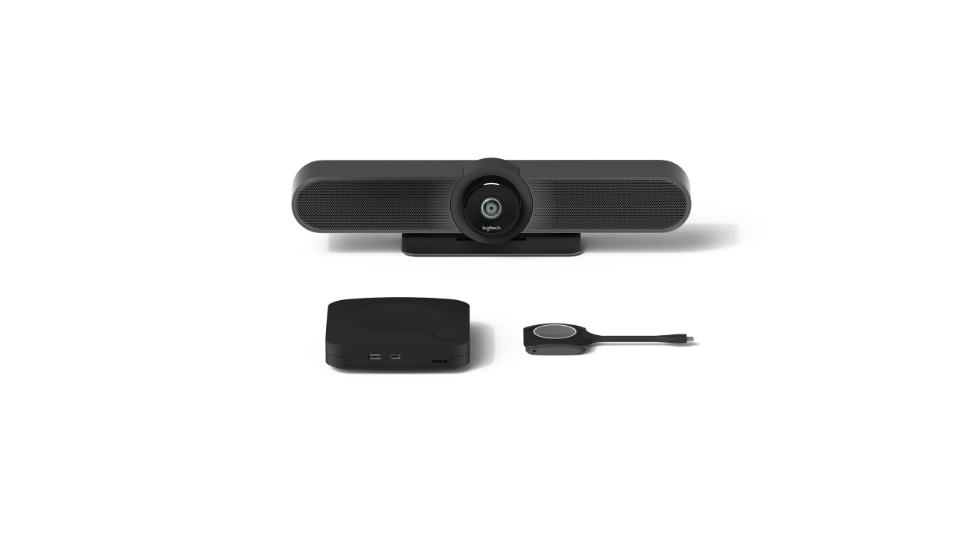
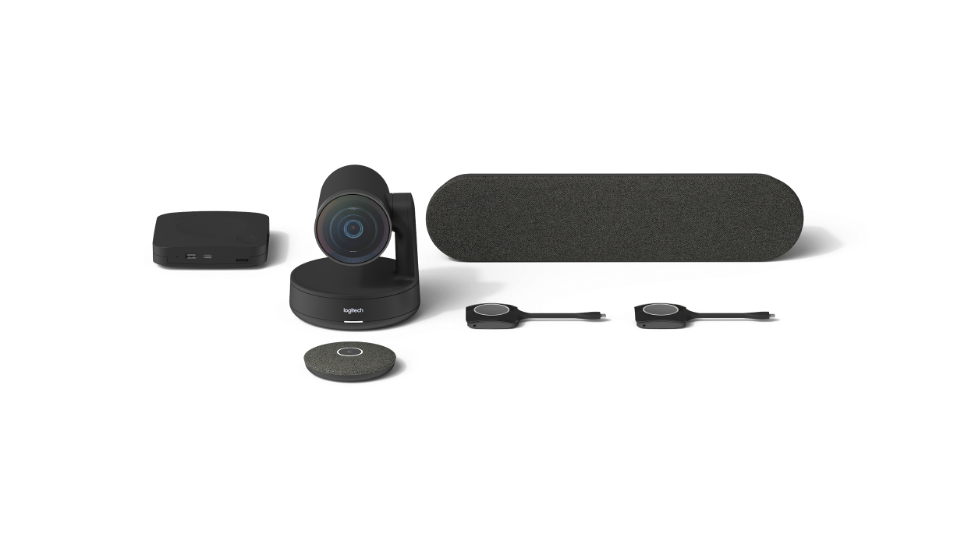
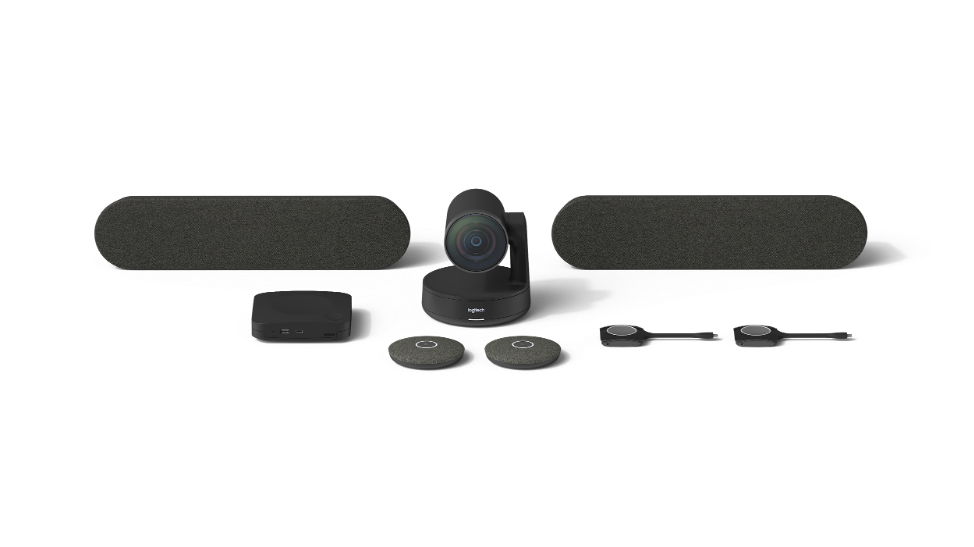
Logitech Rooms Solutions for Barco ClickShare Conference is our joint, all-in-one solution, featuring a Logitech MeetUp or Rally conferencecam, paired with ClickShare Conference. Now, you can connect wirelessly to the meeting room display and conferencecam using your laptop—it’s that simple!
Each solution is a platform-agnostic video conferencing system, giving you even more choice and flexibility. Setup is also a breeze, saving enterprise IT managers, time and resources. Once a meeting room is equipped with Logitech Room Solutions for Barco ClickShare Conference, users just plug the ClickShare Button into their laptop, open the video conferencing app of their choice and click to start.
The all-in-one system includes all the components necessary to video-enable any size meeting room: our award-winning conferencams Logitech MeetUp and Logitech Rally integrated with the newly announced Barco ClickShare Conference CX-20 & CX-30. These packages will be available for small, medium and large meeting rooms and will include the following key components:
Small Room Solution:

Medium Room Solution:

Large Room Solution:

Source : https://blog.logitech.com/2020/02/11/logitech-and-barco-empower-you-to-bring-your-own-meetings-and-start-faster/
Rabu, 01 Januari 2020
Logitech and Avocor Team to Deliver Zoom Rooms for Touch
For the past several years, Logitech has been transforming teamwork with a video collaboration portfolio designed to reduce complexity and help geographically distributed organizations quickly and effectively adapt to today’s new way of working. As part of our vision to video-enabled every meeting space, we’ve created a best-of-breed partner ecosystem to complement our solutions and expand collaboration capabilities to meet the diverse needs of every organization.
This week, we are excited to announce that we have teamed with Avocor, a global leader in the collaboration display space. Our joint offering eases the often complex nature of combining video conferencing with digital whiteboards and touch displays. By combining best-in-class components from Avocor and Logitech, we’ve created a Zoom Rooms for Touch solution that is easy to use and looks great in any huddle room.
The new Avocor ALZ systems feature all-glass for smooth writing, 4K resolution for pristine images, pixel-perfect touch response from fingers or hard-tipped stylus, making them ideal for whiteboarding, and a Zoom-ready OPS. These Zoom Rooms for Touch solutions incorporate Logitech MeetUp, an all-in-one conferencecam with an extra-wide field of view and integrated audio, perfect for small conference and huddle rooms. MeetUp also supports Logitech RightSight™, which automatically moves the camera and adjusts the zoom so no one gets left out of the picture. Thanks to this combined solution, collaboration takes on a whole new meaning as teams can seamlessly share content, co-annotate and collaborate while also seeing and hearing everyone in the meeting.
sumber : https://blog.logitech.com/2019/10/11/logitech-and-avocor-team-to-deliver-zoom-rooms-for-touch/
Minggu, 08 September 2019
Zoom Cloud Meeting
Zoom Cloud Meeting
Ada beberapa fitur yang disuguhkan untuk memudahkan pengguna:
Schedule a Meeting, dengan menggunakan fitur ini kita dapat menjadwalkan untuk melakukan meeting.
Join a Meeting, dengan menekan fitur ini anda akan dapat bergabung bersama rekan anda yang lain tentunya anda harus memiliki Meeting ID atau Personal Link nya.
Host a Meeting, dalam fitur ini terdapat 3 pilihan: 1) With Video Off. 2)with video on. 3) Screen Share only.
Nah, jadi cukup pembahasan tentang Zoom Cloud Meeting, aplikasi yang sangat membantu ketika kita di pisahkan oleh jarak untuk menyelesaikan pekerjaan atau mempresentasikan sebuah projek. Cukup sekian, semoga bermanfaat.
Jumat, 06 September 2019
Solusi Logitech untuk Zoom Room
Tonton video lengkapnya di sini:
Kamis, 29 Agustus 2019
Aplikasi Zoom Meeting Video Conference
Aplikasi Zoom Meeting untuk video conference memang sedang trend pada saat ini, Aplikasi ini dapat di download baik di PC/Laptop, Android, Apple, Chrome, etc.
Aplikasi ini menyediakan beberapa opsi dari yang free dan berbayar. Untuk yang free / Gratis dapat melakukan Conference Call hingga 100 Participants namun dibatasi hanya 40 menit. Berikut gambar dibawah ini beberapa opsi yang sesuai kebutuhan yang ada.
Senin, 26 Agustus 2019
Logitech for Microsoft Teams Rooms
Ketika kami pertama kali meluncurkan Logitech SmartDock (bagian dari Project Rigel) di Keynote Microsoft di Enterprise Connect 2016, Logitech menunjukkan komitmen kami untuk memodernisasi ruang pertemuan: memberikan pengalaman Skype for Business, bergabung dengan satu sentuhan, dan video berkualitas tinggi di sebagian kecil dari biaya sistem video conference tradisional.
SmartDock adalah solusi meeting room Skype for Business yang pertama di pasar, dan kami telah mempertahankan kepemimpinan pasar kami sejak saat itu. Kami terus berinovasi, seperti dengan diperkenalkannya Logitech SmartDock Flex tahun lalu untuk menyederhanakan penempatan. Kami merasa terhormat untuk melayani sejumlah besar pelanggan global, beberapa di antaranya telah menyebarkan solusi ke ribuan ruang meeting room.
Hari ini, kami meningkatkan lingkungan ruang rapat Microsoft lebih jauh dengan pengumuman Logitech Tap. TAP adalah solusi terbaru kami, dan ini benar-benar mendemokrasikan kerja tim di ruang rapat. Dirancang dari bawah ke atas untuk Ruang Tim Microsoft, Tap memanfaatkan pengalaman pasar kami untuk merampingkan dan menyederhanakan penggunaan dan penggunaan konferensi video di setiap ruang pertemuan.
Sebagai komponen integral dari Logitech Room Solutions, Tap menyatukan utilitas yang dibangun khusus dan kualitas bangunan yang kuat dari panel kontrol sentuh ruang rapat dengan harga terjangkau dan fleksibilitas tablet. Ini memberikan panggilan video satu sentuhan dan kesederhanaan bagi pengguna dalam desain ideal yang ramah TI untuk penyebaran pada skala.
Menampilkan layar sentuh 10,1 inci, input HDMI untuk berbagi konten, dan retensi kabel yang kuat, Logitech Tap dirancang dan dirancang untuk kenyamanan yang andal di ruang rapat. Berbagai jenis meja, riser dan dudukan dinding menawarkan fleksibilitas penempatan yang luar biasa, sementara pemasangan kabel di dinding memungkinkan topologi dan tata ruang yang menyenangkan mata serta TI.
Paket Solusi Logitech for Microsoft Teams Rooms mencakup semua komponen yang diperlukan dalam satu paket: pengontrol sentuh Logitech Tap, Logitech conferencecam system, dan komputer form factor kecil yang telah diinstal sebelumnya dengan Microsoft Teams Rooms.