Tampilkan postingan dengan label Logitech Rally. Tampilkan semua postingan

Jumat, 07 Oktober 2022

Logitech Sight

Logitech Sight


Beri peserta jarak jauh tempat duduk di meja dengan Logitech Sight, kamera meja bertenaga AI yang menghadirkan pengalaman Video Conference yang lebih setara. Kamera ini bekerja bahu-membahu dengan Rally Bar atau Rally Bar Mini di bagian depan ruangan untuk menangkap percakapan dari sudut terbaik. Penglihatan membantu peserta jarak jauh melihat dan mendengar dengan lebih baik ke ruang rapat, sehingga mereka merasa seperti benar-benar duduk di meja, dan bukan hanya pengamat sampingan.

Selasa, 14 Desember 2021

Perbedaan Logitech Rally System dan Rally Plus

Perbedaan Logitech Rally System dan Rally Plus


Seperti gambar di atas, Logitech Rally System pada gambar yang pertama sedangkan gambar kedua adalah Logitech Rally Plus. Sekilas hampir sama, namun perbedaan adalah Rally System (1 Mic & 1 Speaker) sedangkan Logitech Rally Plus adalah 2 Mic & 2 Speaker.


Jumat, 30 April 2021

Perbedaan Logitech Rally Plus dengan Logitech Rally Bar

Perbedaan Logitech Rally Plus dengan Logitech Rally Bar


Banyak sekali yang bertanya ke saya Rally Plus dengan Rally Bar bedanya apa ?. Dan ini pasti ditanya mungkin hampir semua orang. bedanya apa yach? ok, kita kupas 1 - 1...


- Rally Bar diperuntukan untuk ruangan medium / sedang dengan tambahan max 3 rally mic pod. Dan update fireware yang terbaru max mic podnya 4 mic pod.


- Rally Plus untuk ruangan large / besar dengan tambahan 7 mic pod rally.


Lalu timbul pertanyaan kembali, apa yang kelebihan rally bar dengan rally plus? Apakah yang dimiliki Rally Bar yang tidak ada di Rally Plus?

- Rally Bar memiliki AI ViewFinder. AI ViewFinder adalah camera untuk mempercepat pergerakan people framing.


- Sudah ada OS yakni ColorOS base in Android. Jadi Didalam Rally Bar sudah ada operation systemny, lalu tinggal di hubungkan ke Logitech TAP dan jangan lupa license Zoom Roomnya atau aplikasi yang mendukung lainnya seperti Microsoft Team Room, Pexip Room, etc sesuai kebutuhannya yang ada.

- Support RJ45. Bagaimana pun video conference lebih bagus & baik mengunakan kabel. tidak ada latency, tidak ada berbagi bandwith karena WiFi. belum lg kalo ada yang ngeJAM, jadi hilang dech koneksi. waduh bisa kacau dengan video conferencenya.


itu saja dahulu, nanti kalo ada yang kurang di update kembali. 
jadi memang secara teknologi Rally Bar lebih tinggi dibandingkan Rally Plus. Namun Rally Plus diperuntukan untuk ruangan meeting besar.

Terima kasih


Sabtu, 24 April 2021

KABEL PERPANJANGAN RALLY MIC POD

KABEL PERPANJANGAN RALLY MIC POD


RALLY MIC POD EXTENSION CABLE 


Dalam installasi Logitech Rally Plus terkadang membutuhkan kabel panjang. Logitech mengeluarkan solusi terserbut. Dengan tambahkan 10 meter jangkauan tambahan ke kabel Rally Mic Pod atau Rally Mic Pod Hub untuk ruang yang lebih besar.
Plenum-rated and Eca certified untuk instalasi komersial Sesuai dengan saluran standar 19mm.
Hubungkan hingga dua kabel dengan total perpanjangan 20 meter

General Specifications 
Extension cable with built-in cable retention clips 
Fits standard 19mm conduit 

Certifications 
Plenum Rated, Eca/IEC 
60332-1-2 Compliant 

System Requirements 
Rally Bar (supports up to 2 cables) 
Rally Bar Mini (supports up to 2 cables) 
Rally (supports 1 cable) 
Rally Plus (supports 1 cable) 
Product Dimensions 
Cable Length: 32.80 ft (10 m) 
Cable Thickness: 0.16in (4.2 mm) 

Package Contents 
Rally Mic Pod Extension Cable 
Documentation 

Part Number 
952-000047


Jumat, 23 April 2021

Perbedaan Logitech MeetUP dengan Logitech Rally BAR

 Perbedaan Logitech MeetUP dengan Logitech Rally BAR


Dari sisi fisik

Perbedaan antara Logitech MeetUP dengan Logitech Rally Bar. Jika dilihat secara fisik bentuk Logitech Rally BAR memang lebih besar dan lebih panjang, panjang sebesar 91cm, Sedang Logitech MeetUP lebarnya hanya 4 cm. Dan jika kita ingin mengangkatnya Logitech Rally Bar memang lebih berat dari yang lain, beratnya sekitar 7 Kg sedangkan berat Logitech MeetUP sebesar 1 Kg. 

Dari sisi Camera & Audio.

Camera Logitech MeetUP sudah support 4K dengan 5X Zoom. dengan View 120'. Sedangkan Logitech Rally Bar Cameranya sudah support 4 K dengan 15x Zoom. Untuk Mic sendiri Logitech Rally Bar didalamnya sudah ada 6 Mic internal sedangkan MeetUP sendiri terdapat 3 Mic 

Dari sisi Port

Logitech Rally banyak sekali Portnya : HDMI Out : 2, HDMI In : 1, USB type A : 3, USB type C : 1, Ethernet : 1 & support Wifi, dan Input Mikrofon External. Sedangkan Logitech MeetUP terdapat 2 port yakni USB type C : 1 dan Input Mikrofon External.

Demikian perbedaan Logitech MeetUP & Rally Bar dari sisi Speak namun perlu diketahui Logitech Rally Bar sudah ada OS di dalamnya yang dinamakan Logitech ColorOS yang berbasis Android Base akan tetapi Logitech Rally Bar Sendiri bisa juga menggunakan USB namun disarankan menggunakan ColorOS jika intergrasi dengan TAP untuk Zoom Room, Teams Room, etc.  


Jumat, 29 Januari 2021

Logitech Zoom Rooms Appliances

Logitech Zoom Rooms Appliances


Logitech’s latest video collaboration products, Rally Bar, Rally Bar Mini and RoomMate, we are very excited to introduce a full portfolio of purpose-built  appliances for Zoom Rooms. Communication and collaboration demand has accelerated in the last year, and Logitech’s native appliance integration for Zoom Rooms will further enhance the Zoom experience while delivering enterprise-grade video, voice, quality, and security.

Logitech’s new portfolio of appliances for Zoom Rooms extends simplicity to Zoom’s collaboration platform for all spaces within an organization.  Managed by Zoom Device Management, the offerings make it easier than ever for IT to manage Zoom Rooms at scale, and for users to find delight in with brilliant optics and high performance audio. With easy out-of-box physical installation and certification as a Zoom Rooms Appliance, Logitech’s  purpose-built collaboration products combine flexibility and smart capabilities with Zoom’s powerful communications platform, further removing friction and empowering happier meetings for our customers.

“We are committed to delivering the best Zoom Rooms experience that customers of all sizes can deploy effortlessly to video-enable every meeting space,” said Sudeep Trivedi, Head of Alliances and Go-To Market, Logitech. “We have worked with Zoom right from the start of the development process to create the latest generation of products that deliver on this promise by seamlessly combining the best-of-breed software and hardware from Zoom and Logitech.” 

The new Logitech product portfolio will allow users to continue to use Zoom’s simple and familiar meeting room interface while increasing organizational adoption – supporting the world’s evolving video collaboration needs during the transition to a new hybrid workplace.

“This year has introduced many challenges for businesses, but also many new opportunities to help customers in new and additional ways,” said Jeff Smith, Head of Zoom Rooms, Zoom. “Extending the Zoom Meeting experience to collaborative Zoom Room environments while supporting current IT initiatives of transforming the workplace for hybrid work is key.  We’re thrilled to join Logitech, a brand whose products were designed for the Zoom experience and deliver more productive meetings for users everywhere.”

Rally Bar, Rally Bar Mini, and RoomMate include Zoom Rooms pre-installed as an appliance and Rally Bar/Rally Bar Mini support Zoom Rooms in USB mode when connected to a host PC/Mac. 

Sabtu, 16 Januari 2021

Logitech Rally Bar Mini

LOGITECH RALLY BAR MINI


Simplicity meets versatility with Logitech Rally Bar Mini, Logitech’s most advanced all-in-one video bar for small meeting rooms and huddle spaces. With studio quality audio and video, AI-driven performance, and flexible deployment options, Logitech Rally Bar Mini sets a new standard for small room collaboration.

PREMIER VIDEO BAR FOR SMALL MEETING ROOMS


Logitech Rally Bar Mini is Logitech’s premier all-in-one video bar for small rooms and huddle spaces. It’s remarkably simple to use, manage, and deploy at scale, delivering the capabilities of larger video bars like Logitech Rally Bar in a compact form factor for smaller spaces. With studio-quality audio and video, motorized pan and tilt, and AI-powered performance, Rally Bar Mini sets new standards for video collaboration.

Scalable across hundreds or thousands of rooms, Logitech Rally Bar Mini offers clutter-free cable management, multiple mounting options, and flexible deployment modes. Plug and play with virtually any PC or Mac, or run supported video conferencing applications on the device without a computer.

SIMPLE TO SET UP

USB Plug and Play : Easily connects to virtually any PC or Mac®, with no additional software required

Appliance Mode : Built-in compute allows you to run supported video conferencing applications such as Zoom directly on the device

All-in-One Design : Sleek, minimal footprint expedites setup and reduces clutter

Streamlined, Flexible Installs : Confidently deploy at scale with smart cable management and multiple mounting options

SIMPLE TO USE

RightSense Technologies

RightSight : Detects meeting participants, automatically moves the lens and adjusts the zoom so no one is left out of the picture

RightLight : Intelligently adjusts video settings in all light conditions so everyone always looks their best

RightSound : AI-driven voice leveling and unwanted noise suppression deliver outstanding clarity

One-Touch Join : Optionally deploy with Tap to quickly and easily initiate meetings across Zoom, Microsoft Teams, and other cloud services

SIMPLE TO MANAGE

Logitech Sync : Single platform to monitor room health and keep devices up to date, plus insights on room occupancy

Deploy Updates at Scale : Easily propagate upgrades and bug fixes to Rally Bar and your other supported Logitech devices

Forward-Looking Architecture : Sync API is a robust foundation for new insights and integrations

Partner Dashboard Support : Fully integrated with partner solutions like Microsoft Teams, Zoom, and others for a simplified device management experience

Logitech Rally Bar Mini - AUDIO


Room-filling Sound : Ultra low distortion speakers with RightSound™ convey every word with outstanding clarity

Adaptive Beamforming Mic Array : Beamforming mics pick up voices at every seat and focus on the active talker while suppressing ambient noise

Expansion Ready : Add up to two Rally mic pods for even greater coverage in larger settings

Logitech Rally Bar Mini - VIDEO


Ultra-HD Video : Brilliantly sharp video, outstanding color, and exceptional optical accuracy at resolutions up to 4K

Expansive Room Coverage : Mechanical pan and tilt covers rooms 163° across by 110° high, with exceptional image quality

Cinema Quality : Logitech RightLight™ technology captures natural-looking skin tones, even in dim or backlit conditions

Logitech Rally Bar Mini - AI VIEWFINDER


Framed to Perfection : A second built-in camera lens has the ability to detect meeting participants, amplifying RightSight™ autoframing

See Everyone Clearly : All meeting participants, even late arrivals, are automatically seen and included 

Move About Freely : AI Viewfinder uses scene awareness to keep the camera on the action

Jumat, 15 Januari 2021

Logitech Rally Bar : All-in-One, Audio/Video, Untuk Ruangan Meeting MidSize

Logitech Rally Bar


ALL-IN-ONE VIDEO BAR FOR MEDIUM ROOMS

Logitech Rally Bar sets a new standard for video meetings in midsize
rooms, with expansion options for larger groups and settings.
It’s remarkably simple to use, manage, and deploy at scale, delivering
cinema-quality video and audio in a sleek, all-in-one form factor. Plug
and play Rally Bar with any PC or Mac, or leverage the built-in compute
to run video conferencing applications directly on the device.

Logitech Rally Bar features a multi-element lens assembly, powerful low
distortion speakers, and an advanced mic system to create meeting
experiences that sound as good as they look. A dedicated AI camera
amplifies RightSight auto-framing and delivers insights about room
usage directly to the Logitech Sync dashboard. Upgrade your video
collaboration with Logitech Rally Bar. 

Jumat, 07 Agustus 2020

Cara Memilih Camera Video Conference untuk Ruangan Meeting, Ruangan Kelas, Etc

Memilih Camera Video Conference untuk Ruangan Meeting, Kelas, etc


- Camaranya memiliki Zoom Camera yang cukup.

Kenapa harus miliki Zoom Camera, dikarenakan membutuhkan menclose-up tulisan yang ditulis dalam papan tulis atau whiteboard. disini letaknya kualitas camera. Bagaimana tulisan tersebut dapat diterima dengan baik oleh peserta video conference.

- Memiliki Camera Preset 

Camera Preset, cara mudah untuk memindahkan camera yang inginkan. karena dengan ini presenter bisa fokus ada yang di tulis atau dan peserta dapat melihat yang diarahkan.
amera dapat menggunakan preset


- Kualitas Camera & Resolusi Camera


Minimal support 1080p namun 4K akan lebih bagus. walaupun resolusi ditentukan oleh compresi ditentukan oleh network dan software. Namun camera wajib mendukung kualitas saat mengcapture gambar / video yang ambil oleh camera tersebut. maka dari itu camera yang bagus adalah kualitas capture dari awal mengambil gambar tersebut. 


- Warranty camera video conference

Nah ini penting sekali mengenai purna jual, pilihlah yang warrantinya yang lama sekitar 2 tahun sedang konsep, rusak di ganti dengan yang baru. bukan di service / repair yach tapi di ganti / di replace dengan yang baru. karena kenapa ? kalo di service/repair butuh waktu lama, sedang mereplace / ganti baru hanya tinggal mengganti aja. Logitech Conference Warranty 2 Tahun 1 - 1 Replacement.

- Memiliki Certificate software

Ini saat penting. Hardware Camera Video conference harus memiliki Certificate Software yang akan di gunakan. ini untuk menunjang kualitas video conference berjalan. jadi fitur-fitur yang ada di software tersebut dapat berintergrasi dengan hardware yang sudah memiliki certificate. Logitech merupakan 


- Memiliki support software untuk mendukung camera.,

- Camera bisa menggunakan Tripod.


Senin, 26 Agustus 2019

Logitech Room Solutions for Google Hangouts

Logitech Room Solutions for Google Hangouts


Perusahaan global dan small business sama-sama dengan mengadopsi G Suite untuk meningkatkan berbagi pengetahuan, pengambilan keputusan, dan kolaborasi. Dari perangkat seluler hingga desktop, aplikasi ini memungkinkan individu dan tim untuk berkinerja lebih baik, lebih cepat, dan lebih efektif.

Dengan diperkenalkannya Logitech Room Solutions for Google Hangouts, pengalaman intuitif dan kuat yang sama yang dinikmati setiap pengguna kini diperluas ke lingkungan ruang rapat dan ruang konferensi. Pelanggan mendapat manfaat dari pertemuan video yang andal dan mudah diikuti, dan tim TI mendapat manfaat dari serangkaian komponen yang mudah digunakan yang dikerahkan yang bekerja sama secara menyeluruh untuk memberikan pertemuan video yang menarik dan terjangkau.

Dikembangkan dalam kemitraan erat antara Logitech dan Google, Logitech Room Solutions for Google Hangouts mencakup semua komponen yang diperlukan untuk mengaktifkan video ruang rapat ukuran apa pun: pengontrol sentuh ruang rapat baru kami yang disebut Logitech Tap, Chromebox yang memenuhi syarat untuk perangkat keras Google Hangouts Meet, dan keduanya Logitech Meetup untuk lingkungan ruang ngerumpi, atau Logitech Rally untuk ruang konferensi berukuran sedang dan besar.

Logitech Tap menggabungkan kesederhanaan sekali sentuh untuk pengguna dengan fitur-fitur IT dan AV-friendly seperti beberapa opsi pemasangan, kabel USB 10 meter yang kuat, dan mekanisme retensi kabel yang kuat. Untuk mengaktifkan berbagai opsi penyebaran, kabel 25 meter opsional juga tersedia. Selain itu, pemasangan Chromebox dengan retensi kabel dengan mudah mengamankan Chromebox di bawah meja atau di belakang layar.

Logitech MeetUp adalah ConferenceCam all-in-one solution, dengan bidang pandang 120 ° dan audio terintegrasi, sempurna untuk ruang meeting kecil dan ruang huddle Room.

Logitech Rally adalah sistem ConferenceCam premium Logitech, dengan desain modular yang dapat diskalakan untuk ruang pertemuan berukuran sedang hingga ruang rapat. Ini menetapkan standar untuk kualitas video, kejernihan suara, dan desain industri, dan merupakan pengganti yang ideal untuk sistem kamar tradisional berbiaya tinggi.

Semua komponen Solusi Ruang Logitech - termasuk Logitech Tap, Logitech MeetUp atau Logitech Rally dan Chromebox - memenuhi syarat untuk Google Hangouts dan akan menerima pembaruan otomatis.

Sabtu, 20 April 2019

Cara Installasi Logitech Rally System

Cara Installasi Logitech Rally System


Logitech Rally merupakan product baru Logitech. Untuk solusi ruangan meeting sedang dan besar. Logitech Rally System memhadirkan dengan design modular. dan mempunyai teknologi Logitech RightSense.

Berikut Gambar dibawah ini Packages dari Rally System yakni Rally dan Rally Plus.


Berikut Gambar dibawah ini adalah componen dari Rally System


Logitech Rally terdapat Mic Pod untuk mic sedangkan Mic Hub untuk per

Beamforming with Reverb Rejection
  • Each Mic Pod contains 4 beamforming elements for 8 separate beams
  • Beams focus on active speakers while automatically blocking reverberation
  • Up to 7 Mic Pods work together as a beamforming matrix


Maximum Coverage
  • Pickup range: 15 ft / 4.5m diameter
  • Captive 9.6 ft (2.95m) 12-pin cable
  • Deploy up to 7 Mic Pods for maximum coverage in large rooms

Berikut komponen - komponen didalam Box Logitech Rally :

Diagram Table Hub :


Diagram Display Hub :

Berikut dibawah ini gambar implementasi dengan PC diletakkan di Table Hub


Berikut dibawah ini gambar implementasi dengan PC diletakkan di Display Hub


Agar lebih mudah, berikut video cara installasi Logitech Rally System :


Minggu, 18 November 2018

Logitech Rally System

Logitech Rally System


Logitech Rally System offers an Ultra-HD imaging system, delivering brilliantly sharp video, outstanding color, and exceptional optical accuracy at resolutions up to 4K. The modular audio system brings crisp, clear audio and unmatched voice clarity to the table.

Logitech Rally System comes standard with one speaker and one mic pod for medium and large sized meeting rooms. For larger spaces, you can add one additional speaker and up to six additional mic pods.


Logitech Rally System modular audio components mean that speakers and mic pods can be placed wherever
they are needed, achieving full audio coverage in your meeting space. Rally supports up to seven
mic pods in total, helping you create the perfect audio configuration for your space.

Logitech Rally System features RightSense™ proactive technologies, which make better meetings easy and automatic. RightSight™ auto-frames participants no matter their distance from the lens, RightLight™ prioritizes faces over environment to render natural-looking skin tones, while RightSound™ enhances vocal clarity by suppressing background noise, autoleveling voices, and focusing on active speakers. RightSense is compatible with most any video conferencing application that works with USB devices, including Google Hangouts, Microsoft Skype for Business and Teams, and Zoom.

Elegantly designed with premium finishes, thoughtful cable management, and modular audio, Logitech Rally System integrates beautifully into any roomdesign.

Sabtu, 17 November 2018

Logitech Rally Camera

LOGITECH RALLY CAMERA


With premium industrial design and an Ultra-HD imaging system, Logitech Rally Camera tops the lineup of standalone video cameras from Logitech®. Packed with advanced optics and breakthrough
technology enhancements, Rally Camera delivers peerless performance, exceptional versatility, and
easy deployment.

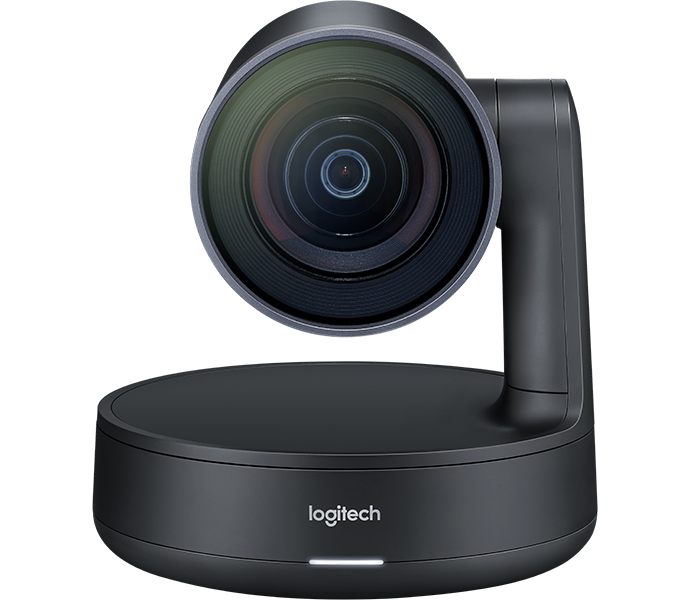
Logitech Rally Camera combines world-class Logitech optics and 4K sensor with whisper-quiet mechanical pan, tilt, and zoom functions and high-end materials. suitable for any professional setting. With razorsharp 15X HD zoom, expansive 90° field of view, and truly phenomenal video quality, Rally Camera captures every person in the room with amazing clarity.

Rally Camera
Logitech RightSight™ camera control* automatically moves and adjusts the lens to comfortably  rame participants in rooms of all shapes and sizes while Logitech RightLight™ technology optimizes light balance to emphasize. faces and render natural-looking skin tones, even in dim or backlit conditions.

Logitech Rally Camera offers versatile mounting and cabling options for easy installation and integrates seamlessly with existing audio infrastructure. Plus, USB plug-and-play ensures compatibility with every leading video conferencing software platform with no additional software required.