Tampilkan postingan dengan label Skype for Business. Tampilkan semua postingan

Senin, 26 Agustus 2019

Logitech for Microsoft Teams Rooms

Logitech for Microsoft Teams Rooms


Ketika kami pertama kali meluncurkan Logitech SmartDock (bagian dari Project Rigel) di Keynote Microsoft di Enterprise Connect 2016, Logitech menunjukkan komitmen kami untuk memodernisasi ruang pertemuan: memberikan pengalaman Skype for Business, bergabung dengan satu sentuhan, dan video berkualitas tinggi di sebagian kecil dari biaya sistem video conference tradisional.

SmartDock adalah solusi meeting room Skype for Business yang pertama di pasar, dan kami telah mempertahankan kepemimpinan pasar kami sejak saat itu. Kami terus berinovasi, seperti dengan diperkenalkannya Logitech SmartDock Flex tahun lalu untuk menyederhanakan penempatan. Kami merasa terhormat untuk melayani sejumlah besar pelanggan global, beberapa di antaranya telah menyebarkan solusi ke ribuan ruang meeting room.

Hari ini, kami meningkatkan lingkungan ruang rapat Microsoft lebih jauh dengan pengumuman  Logitech Tap. TAP adalah solusi terbaru kami, dan ini benar-benar mendemokrasikan kerja tim di ruang rapat. Dirancang dari bawah ke atas untuk Ruang Tim Microsoft, Tap memanfaatkan pengalaman pasar kami untuk merampingkan dan menyederhanakan penggunaan dan penggunaan konferensi video di setiap ruang pertemuan.

Sebagai komponen integral dari Logitech Room Solutions, Tap menyatukan utilitas yang dibangun khusus dan kualitas bangunan yang kuat dari panel kontrol sentuh ruang rapat dengan harga terjangkau dan fleksibilitas tablet. Ini memberikan panggilan video satu sentuhan dan kesederhanaan bagi pengguna dalam desain ideal yang ramah TI untuk penyebaran pada skala.


Menampilkan layar sentuh 10,1 inci, input HDMI untuk berbagi konten, dan retensi kabel yang kuat, Logitech Tap dirancang dan dirancang untuk kenyamanan yang andal di ruang rapat. Berbagai jenis meja, riser dan dudukan dinding menawarkan fleksibilitas penempatan yang luar biasa, sementara pemasangan kabel di dinding memungkinkan topologi dan tata ruang yang menyenangkan mata serta TI.

Paket Solusi Logitech for Microsoft Teams Rooms mencakup semua komponen yang diperlukan dalam satu paket: pengontrol sentuh Logitech Tap, Logitech conferencecam system, dan komputer form factor kecil yang telah diinstal sebelumnya dengan Microsoft Teams Rooms.

Selasa, 03 Mei 2016

Video Conference Skype For Business

 Video Conference Skype For Business


Video Conference merupakan salah satu fitur utama didalam Skype for Business baik online maupun on prime yang berguna  untuk menghubungkan sesama pengguna didalam satu ruang konferensi yang sama dan secara bersama-sama didalamnya untuk saling berkomunikasi dan bertukar informasi untuk kepentingan bisnis perusahaan. Video Conference Skype for Business Online memiliki kapabilitas sampai dengan 250 pengguna dalam satu ruang konferensi yang sama melalui perangkat desktop/laptop dan juga smartphone (IOS, Android, dan Windows Phone)

Video Conference Skype for Business dapat dilakukan diruangan meeting secara bersama-sama. Dengan menggunakan Logitech Video Collaboration dan salah satunya unitnya yaity Logitech Group solusi itu dapat terpecahkan. dengan harga yang sangat mudah terjangkau. Bahkan Logitech membuat room meeting atau Skype Room System untuk Video Conference Skype for Business yang diberi nama Logitech Smart Dock.


Video Conference Skype

Fitur - Fitur yang biasa digunakan untuk Video Conference Skype For Business :

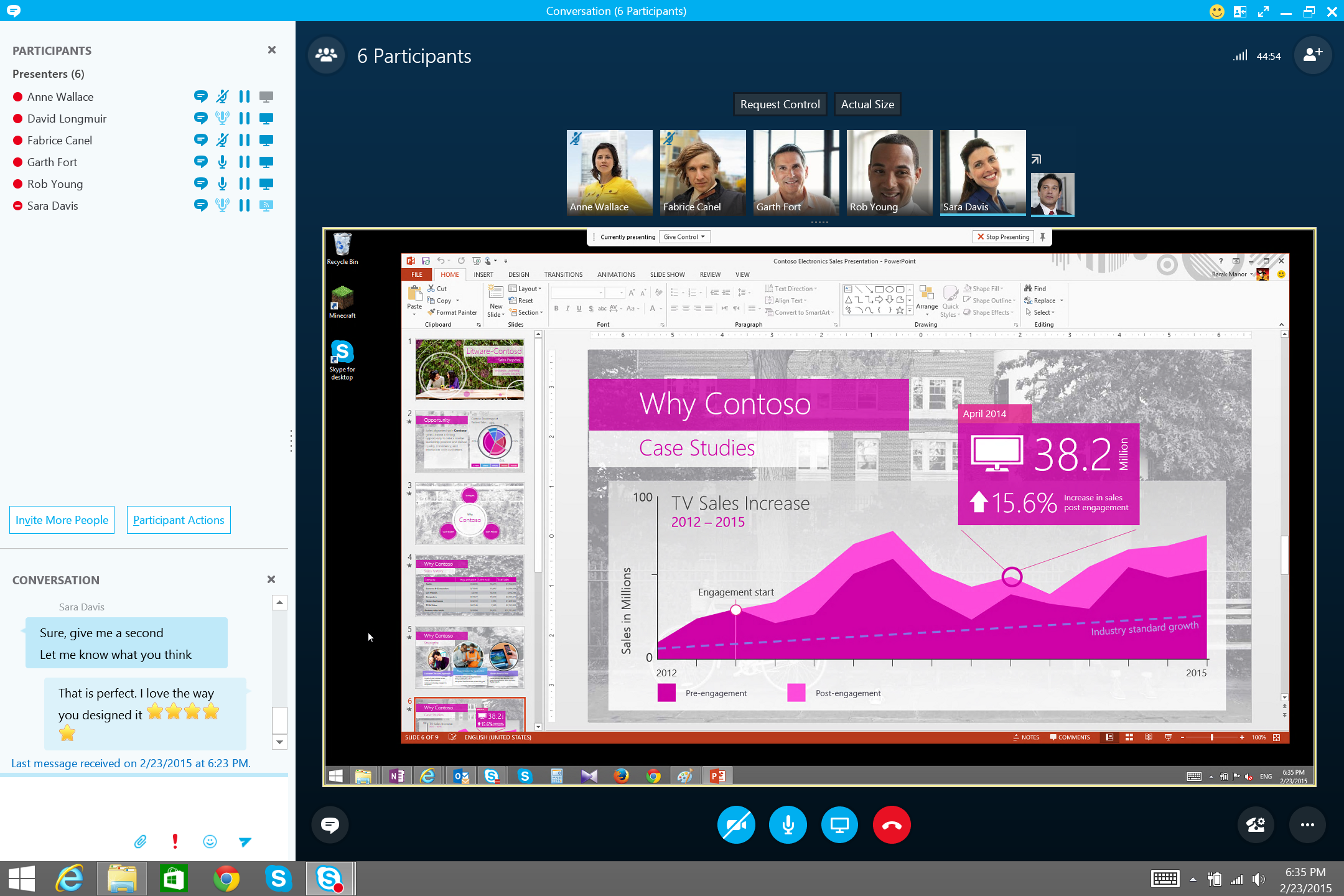
1.       Presentasi Power Point

Fitur yang berguna untuk menampilkan materi presentasi berupa file powerpoint, sehingga memudahkan proses meeting pada saat konferensi, apabila didalamnya membutuhkan penyajian data - data tertentu dari proses bisnis yang sedang berjalan.

Video Conference Skype 
                                                                                                                                                 

2.        Remote Desktop

Merupakan salah satu fasilitas didalam Video Conference Skype for Business yang berguna untuk membantu permasalahan (troubleshoot) antar sesama pengguna, sehingga mereka dapat mengontrol komputer sesama secara real-time dengan mudah dan cepat.

Video Conference Skype

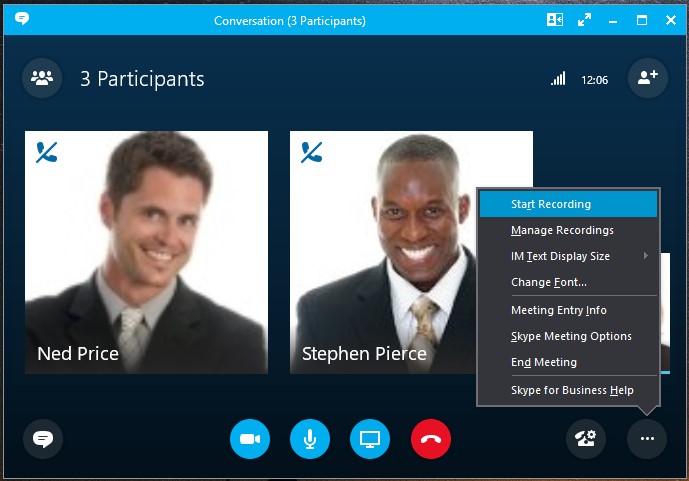
3.        Recording

Salah satu fitur didalam Video Conference Skype for Business yang memungkinkan pengguna untuk merekam aktifitas konferensi meeting berjalan, sehingga dapat menjadi notulen meeting yang berguna bagi perusahaan.

Video Conference Skype for Business 


4.       Whiteboard

Salah satu fitur kolaborasi yang memungkinkan pengguna untuk dapat saling bersama – sama  dalam melakukan kolaborasi terhadap ide – ide yang dapat dituangkan diatas kanvas putih layaknya untuk menggambar didalam aplikasi Skype for Business.

 Video Conference Skype for Business


Senin, 11 April 2016

AudioCodes CloudBond 365 Deployment


AudioCodes CloudBond 365 Deployment Scenarios

AudioCodes’ CloudBond 365 is a versatile appliance. Here are the most common migration use cases for Cloud PBX, leveraging CloudBond 365:

Single Site/HQ

From SMB up to 5,000 enterprise users, CloudBond 365 can be deployed as the main Skype for Business voice infrastructure, connecting to Office 365 or in a standalone mode. Leveraging the native capabilities of the Skype for Business server, CloudBond 365 can also be deployed in disaster recovery (all models) or full high availability modalities (CloudBond 365 Pro Box and Enterprise Box Editions only).

Branch Sites

Providing full survivability and local PSTN termination, CloudBond 365 is an ideal solution for obtaining maximum communications performance for remote branches. Whether it is connected to the main HQ Skype for Business server deployment or a partner-hosted platform, branch users can enjoy uninterrupted optimal service for all communications modalities, even in the case of a WAN failure.

Cloud PBX: Local PSTN Connectivity Hybrid Scenario

CloudBond 365 provides connectivity to the cloud on the one hand and to the PSTN on the other. It facilitates a simple migration with a hybrid approach, starting with only some users registered to the cloud and others registered to the on-premises CloudBond 365. CloudBond 365 can support the hybrid Cloud PBX – local PSTN connectivity scenario in a variety of ways including:
  • A greenfield deployment in which there was no prior implementation of a Lync/Skype for Business infrastructure and the company wants to migrate some, but not all of its users to the cloud
  • A full cloud deployment for headquarters users while remote branches use the local PSTN
  • An existing Lync/Skype for Business infrastructure where the customer may want to leave office users homed in the on-premises infrastructure for full PSTN and PBX capabilities but may also want to migrate information workers to Cloud PBX

CloudBond 365 Benefits and Features

  • Enables the migration to Skype for Business enterprise voice providing the option to have full PBX features or be homed in Cloud PBX
  • Offers a complete Skype for Business solution that integrates the connectivity and management tools in one package
  • Comes in different box edition sizes, as a virtualized appliance, or as a management pack and can adapt to different architectures and business models
  • Delivers special management interfaces for Office 365 and the corporate Active Directory, which automate the Hybrid or Cloud PBX connection
  • Supports new user management capability to simplify user policy management
  • Offers backup and restore support
  • Includes desk phone management capabilities

Sabtu, 09 April 2016

AudioCodes Session Experience Manager (SEM) for Skype for Business

AudioCodes Session Experience Manager (SEM) for Skype for Business is an intelligent analysis tool designed to quickly detect, monitor and analyze the quality of Voice over IP calls within a Microsoft Skype for Business environment. It remediates real-time problems over a VoIP ecosystem comprising of Skype for Business and AudioCodes’ One Voice integrated solution.
Expanding on the ability to detect and correct all voice calls going through AudioCodes One Voice for Skype for Business offering (SBCs, Gateways, and IP Phones), the SEM now has visibility on all voice calls within the Microsoft Skype for Business environment, including Skype for Business to Skype for Business, Skype for Business to Federated, Skype for Business to remote workers, Skype for Business to Gateway/SBC, Skype for Business to mediation server.
Session Experience Manager (SEM) for Skype for Business
Skype for Business administrators have a network view which can show information about any call, originating internally or externally, in real time. SEM’s intuitive GUI offers a very fast drill down capability from the network view to specific calls anywhere on the network. Additionally, the capability for conducting an easy Root Cause Analysis for troubleshooting calls between the different Skype for Business servers (mediation, edge, etc.), provides administrators with the ability to pinpoint the precise location of the problem within the Microsoft Skype for Business environment. SEM provides alarms in real time which can be propagated via a variety of interfaces such as SNMP, email and SMS.

Features

  • SEM monitors and analyzes both Skype for Business and Audiocodes’ components as a complete solution
  • Probe-less software architecture. No need for additional hardware probes to monitor the full Skype for Business ecosystem
  • Encapsulate multiple Skype for Business front-end server voice traffic monitoring into a single view
  • SEM integrates with Audiocodes’ EMS to resolve detected problems
  • SEM for Skype for Business is part of AudioCodes comprehensive Microsoft Skype for Business portfolio providing a “one-stop-shop”
  • Active probes for pre/post deployment assessments can be added
  • Real time NOC and detailed calls statistics
  • Comprehensive user experience with easy drill down from network view to calls information details
  • Provides alarms on quality degradation as well as call control problems in real time

Benefits

  • Monitors and analyzes both Skype for Business and AudioCodes components as a complete solution
  • Probe-less s/w architecture. No need for additional h/w probes to monitor the full Skype for Business eco system
  • Integrates with AudioCodes’ EMS to resolve detected problems
  • Single vendor for all voice related expertise
  • Real time detailed call statistics
  • Multi-site network topology view
  • Comprehensive user experience with easy drill down from network view to call information details
  • Provides alarms on quality degradation in real time
  • Active probes for pre/post deployment assessments can be added

Sabtu, 05 Maret 2016

Polycom VVX 600 Series Business Media Phones

Polycom VVX 600 Series Business Media Phones


Polycom VVX 600 Series Business Media Phones is premium Business Media phone delivering best-in-class desktop productivity for corporate executives and managers.


Enhance productivity and enrich collaboration with the ultimate, all-in-one, one-touch desktop UC solution designed specifically for executives, managers and knowledge workers. Polycom VVX 600 series business media phone delivers a best-in-class personal communications experience with an extensive list of easy-to-use features that complement the way you work. Polycom VVX 600 series is simple for administrators to deploy, maintain and upgrade while seamlessly integrating with third-party productivity applications. Leverage previous IT infrastructure investments and protect your investment into the future with options such as add-on video, wireless and other accessories.

Technical Polycom VVX 600 Series Business Media Phones

ar

  • Enhance executive productivity
    • Large (4.3”) TFT (480 x 272) capacitive touch-screen
    • Up to 16 line appearances/speed dials
    • Hard Keys: 12-key keypad, home, speaker, mute, volume, headset
    • Video playback and video conferencing via external USB cam
    • Integrated Bluetooth
  • Best-in-class personal communications
    • Legendary Polycom HD Voice technology up to 14KHz on all audio paths (Speaker, Handset, Headset) 
    • 2 x Ethernet 10/100/1000
    • 2 x USB 2.0 host
    • Green – low power
  • Simple to deploy and easy to administer, upgrade, and maintain
    • Plug and play provisioning with zero touch provisioning
    • Robust SIP feature stack
  • Easy integration with third-party UC and productivity applications
    • Complete API tooklit for custom development
    • Full Browser (Webkit)
  • Get the most from your investments
    • Broad accessory support (Expansion Modules, Video camera accessory)
    • Microsoft Lync interoperability

Polycom VVX 300 Series Business Media Phones

Polycom VVX 300 Series Business Media Phones

Jual Polycom VVX 300 Series Business Media Phones

Polycom VVX 300 Series Business Media Phones powerful entry-level Business Media phone for today's cubicle workers


These powerful 6-line entry-level Business Media Phones are for today's cubicle workers that handle a low to moderate volume of calls and need crystal clear communications.
Give your cubicle worker the best experience with this high quality UC Business Media Phone. Designed for a broad range of environments for small and medium businesses.
  • Make more efficient and productive calls with the unparalleled voice clarity of Polycom HD Voice
  • Improve productivity for cubicle worker’s and call center operators through an intuitive easy to use user interface
  • Reduce deployment and maintenance costs—the Polycom Zero Touch Provisioning and web based configuration tool makes the VVX 300 series simple to deploy, easy to administer, upgrade, and maintain
  • Leverage previous IT infrastructure investments—deploy VVX 300 series business media phones on your existing network without needing to upgrade your call control platform
  • Easily to integrate with third- party web-based UC and productivity applications for broad, standards based, open APIs

Technical Polycom VVX 300 Series Business Media Phones


Jual Polycom VVX 300 Series Business Media Phones
  • Backlit grayscale graphical LCD (208 x 104)
  • 6 line or speed dial keys
  • HD Voice up to 7KHz on all audio paths (Speaker, Handset, Headset) 
  • 2 x Ethernet 10/100 or GigE (VVX 310)
  • Asian character support
  • Hard Keys: 12-key dial pad, home, speaker, mute, headset, volume, messages, hold, transfer
  • 4-way navigation cluster with center "select" key
  • Supports VVX Expansion Module and VVX Color Expansion Module (Expandability up to 3 modules)

Polycom VVX 400 Series Business Media Phones

Polycom VVX 400 Series Business Media Phones

Jual Polycom VVX 400 Series Business Media Phones

These color 12-line mid-range Business Media Phones are for today's office workers and call attendants who depend on crystal clear communications
Give your call attendant a high-quality, cost effective UC solution that will handle their moderate  call volume and provide them with the advanced telephony features they expect from a modern media phone.
  • Make more efficient and productive calls with the unparalleled voice clarity of Polycom HD Voice
  • Improve productivity for office staff and cubicle worker’s via an intuitive larger, color display and easy to use line appearances
  • Reduce deployment and maintenance costs—the Polycom Zero Touch Provisioning and web based configuration tool makes the VVX 400 series simple to deploy, easy to administer, upgrade, and maintain
  • Leverage previous IT infrastructure investments—deploy VVX 400 series business media phones on your existing network without needing to upgrade your call control platform
  • Easily integrate with third- party UC and productivity applications for broad, standards-based, open APIs

Technical Polycom VVX 400 Series Business Media Phones

Jual Polycom VVX 400 Series Business Media Phones
T
  • 3.5" TFT (320 x 240)
  • 12 lines or speed dial keys
  • HD Voice up to 7KHz on all audio paths (Speaker, Handset, Headset)
  • 2 x Ethernet 10/100 or GigE (VVX410 )
  • Asian character support
  • Hard Keys: 12-key dial pad, home, speaker, mute, headset, volume, messages, hold, transfer
  • 4-way navigation cluster with center “select” key
  • Supports VVX Expansion Module and VVX Color Expansion Module (Expandability up to 3 modules)

Polycom VVX 500 Series Business Media Phones

Polycom VVX 500 Series Business Media Phones


A desktop phone that works for you
The Polycom VVX 500 series business media phone is designed for today’s busy managers and knowledge workers. It is a powerful yet intuitive office phone that can keep up with their multitasking and schedule juggling.
Designed for a broad range of UC environments, the VVX 500 series improves productivity through a touch-screen interface. It also serves as an application platform that complements the applications on the user’s computer.
Polcom VVX 500 series supports expansion modules for applications such as personal videoconferencing and wireless networking. It is easy to deploy and manage with an enterprise-grade configuration method, so administrators can easily provision and maintain handsets throughout the enterprise.
Designed for enhanced interoperability, Polycom VVX 500 series leverages your existing IT investments by integrating with more IP PBX systems than any other business media phone in the industry.

It offers:
  • UC Software and  Polycom Desktop Connector to PCs; keyboard and mouse sharing
  • Microsoft Exchange calendar integration
  • Touch-screen interface
  • Expandable accessories for video and wireless
  • Open application platform and Web browser
  • Simple, flexible and secure provisioning options

Technical Polycom VVX 500 Series Business Media Phones


  • 3.5” (9-cm) TFT (320 x 240)
  • Up to 12 line appearances
  • Immersive capacitive touch UI
  • Streaming media video playback
  • Video conferencing via external USB cam (coming post FCS)
  • Full Browser (Webkit)
  • HD Voice up to 14KHz on all audio paths (Speaker, Handset, Headset)
  • 2 x Ethernet 10/100/1000
  • 2 x USB 2.0 host
  • “Green” – low power
  • Hard Keys: 12-key keypad, home, speaker, mute, volume, headset
  • Supports expansion modules
  • Headset and Accessories: RJ9 wired headsets, Wireless connectivity via electronic hook-switch, read headset, Tech bulletin
  • USB-wired headsets
  • Wireless USB headsets


Polycom VVX 201 Business Media Phone

Polycom VVX 201 Business Media Phone

Jual Polycom VVX 201 Business Media Phone

The Polycom VVX 201 business media phone is a two-line SIP phone designed for small businesses and medium-sized organizations delivering HD Voice technology and a wide range of business telephony features.
  • Use the Polycom VVX 201 is a basic two line desk phone for call centers, retail environments and for shared/common-areas
  • Make more efficient and productive calls with Polycom’s HD Voice technology
  • Deploy the Polycom VVX 201 in hosted or premise-based environments
  • Reduce deployment and maintenance costs—the Polycom Zero Touch Provisioning and web-based configuration tool makes the Polycom VVX 201 simple to deploy, easy to administer, upgrade, and maintain
  • Leverage previous IT infrastructure investments—deploy Polycom VVX 201 business media phones on your existing network without needing to upgrade your call control platform


Technical Polycom VVX 201 Business Media Phone


  • 2 line
  • 132x64 monochrome backlit LCD
  • Polycom HD Voice up to 7 kHz on all audio paths (speaker, handset, headset)
  • 2 x ethernet 10/100
  • Hard Keys: 12-key dialpad, home, speaker, mute, headset, volume
  • 4-way navigation cluster with center "select" key

Senin, 29 Februari 2016

Polycom CX600

Polycom CX600

Jual Polycom CX600

The Polycom CX600 is an IP phone optimized for Microsoft Lync


A full-featured IP desktop phone with a large color display and Polycom HD Voice technology
The Polycom CX600 IP phone delivers all the features included in Microsoft Lync environments. You’ll find it to be a cost effective mainstream desktop phone that features Polycom HD Voice technology for crystal-clear calls and robust interoperability with Lync. It maximizes productivity for workers in offices and cubicles.
  • Embedded client does not require a PC to make calls, gain access to personal contact information, or other advanced features
  • Polycom HD Voice technology in the handset, headset, and speakerphone for stunning voice quality and clarity
  • On-screen presence status indicators for each of a user's contacts and a large, bright LED shows your current presence state


Technical Polycom CX600

Jual Polycom CX600

  • Optimized for Lync 2013 and Lync 2010
  • Embedded Lync Phone Edition client
  • A 3.5-inch (9-cm) TFT color display
  • A two-port gigabit Ethernet switch
  • USB “Better Together” functionality for pairing with a PC

IP Phone for Skype for Business

IP Phone for Skype for Business

Microsoft plans to test and certify IP phones for Skype for Business through the Skype for Business Certification Program. This reflects an evolution from the previous basic interop compatibility to a higher quality bar, including metrics targeting higher reliability. Phone vendors are actively working to meet this higher bar and will be qualifying against the new requirements starting the end of this calendar year.
In the meantime Skype for Business supports backwards compatibility with all of our Lync qualified IP phones. Find more technical resources and updates to our IP Phone category on TechNet.
  • Premier smart hub for group collaboration that transforms the iconic three-point phone into a...

  • An entry-level two-line IP phone with 2 Ethernet ports and HD sound quality for clear...


  • The Polycom VVX 500 business media phone is designed for today's busy managers and knowledge...


  • These color 12-line mid-range Business Media Phones are for today's office workers and call...


  • These color 12-line mid-range Business Media Phones are for today's office workers and call...


  • These powerful 6-line entry-level Business Media Phones are for today's cubicle workers that handle...


  • Enhance productivity and enrich collaboration with this all-in-one, one-touch desktop UC solution...


  • YEALINK SIP-T48G
    An elegant IP phone designed for business executives and professionals. Its Optima HD technology...


  • YEALINK SIP-T22P
    A cost effecitve phone featuring an intuitive user interface and enhanced functionality which making...


  • AUDIOCODES 430HD IP PHONE
    An advanced, mid-range enterprise IP phone built for ease-of-use and convenience. The 430HD boasts a...


  • AUDIOCODES 440HD IP PHONE
    A high-end executive IP phone inlcuding a dedicated LCD screen displaying contacts and their...


  • A high-definition IP phone, offering cutting-edge technology, high voice quality and a sleek and...


  • SPECTRALINK 84-SERIES WIRELESS TELEPHONE...
    Designed for the requirements of mobile workers in healthcare, retail, hospitality, and...


  • SPECTRALINK 7000 PORTFOLIO HANDSETS
    Built for demanding users with a focus on usability, functionality, design and quality, the...


  • POLYCOM SOUNDPOINT IP 650
    An SIP desktop phone with crystal-clear voice quality and advanced features that support...


  • POLYCOM SOUNDPOINT IP 560
    A four-line GigE SIP phone that delivers calls of unprecedented richness and clarity. It also...


  • POLYCOM SOUNDPOINT IP 550
    A four-line SIP desktop phone with crystal-clear voice quality. It also offers a comprehensive...


  • POLYCOM SOUNDPOINT IP 450
    A three-line SIP desktop phone with crystal-clear voice quality. It also offers a comprehensive...


  • POLYCOM SOUNDPOINT IP 335
    A two-line enterprise-grade IP deskphone with excellent sound quality that is easy to use. It is...


  • POLYCOM SOUNDPOINT IP 321 AND 331
    Two-line enterprise-grade IP deskphones with excellent sound quality and features. Designed for...


  • POLYCOM CX500
    Make calling convenient for common areas such as lobbies, hallways and break rooms with the...


  • A full-featured IP desktop phone with a large color display and Polycom HD Voice technology. The...


  • HP 4120 IP PHONE
    This phone is optimized for use with Lync unified communications, and it supports Office 365. All...


  • HP 4110 IP PHONE
    Ideal for deployment in common areas such as lobbies.  Lync optimized stand-alone...


  • MITEL MIVOICE 6725 LYNC PHONE
    Offering the Lync phone feature set, including support of "Better Together" desktop link. The Mitel...