Rabu, 18 Mei 2016

Infocus Mondopad

Infocus Mondopad


Infocus Mondopad adalah Tablet besar berbasis Windows 7 Pro didalamnya dan dilengkapi dengan beberapa aplikasi layar sentuhan built-in, termasuk presentasi interactive video conferencing dan document viewer. InFocus Mondopad telah diluncurkan oleh InFocus yang berbasis di Portland, Oregon, sebuah perusahaan yang paling terkenal untuk produk LCD Projector.

      Berikut beberapa fitur infocus mondopad :

Interactive Presentation

Infocus Mondopad dapat digunakan sebagai perangkat untuk melakukan presentasi yang interaktif dan menarik. Dapat pula membaca file Microsoft Office dengan baik. Presentasi menjadi lebih interaktif dengan layar sentuh dan fitur anotasi yang dapat memudahkan pengguna


Whiteboard
InFocus Mondopad dapat difungsikan sebagai Digital Whiteboard sehingga memudahkan presenter untuk menuangkan ide-ide yang bisa disimpan langsung berupa file image dengan format Jpg, atau PDF dan mengirimkan file langsung ke peserta rapat via Email dan langsung di cetak melalui koneksi printer. Whiteboard juga berfungsi mengurangi penggunaan kertas sebagai media tulis sehingga perangkat ini mendukung program Go Green.


Control View
Melalui Fitur ini pengguna dapat mengontrol Mondopad dengan menggunakan Laptop, PC bahkan Ipad dan Tablet Android secara wireless. Dengan menggunakan aplikasi Control View ini Interaksi dua arah bisa dilakukan antara mondopad dengan laptop, tablet android atau Ipad. Untuk melakukannya dua cara, yaitu melalui koneksi Wi-fi yang tersedia di Lokal office ataupun langsung ke Wi-fi lokal Mondopad.


PRESENT2
Fitur ini memudahkan pengguna dalam melakukan presentasi dari laptop ke Mondopad, karena tanpa menggunakan kabel dan projector, pengguna dapat menampilkan file presentasi yang terdapat pada laptop atau PC secara wireless. Pada layar Mondopad juga bisa mengontrol laptop atau PC.

MONDOPAD VIEW AND SHARE
Dengan fitur ini, pengguna juga dipermudahkan untuk melihat presentasi melalui Laptop, PC ataupun Tablet dan Smartphone jika pengguna tidak bisa melihat langsung ke display Interactive Collaboration Board akibat dari ruang pertemuan yang cukup luas. Pengguna juga dapat mengirimkan atau Share file berupa image, file Power Point, Word, atau Excel. Untuk menggunakan fitur ini pengguna hanya perlu terhubung ke koneksi Wi-fi Head Office ataupun Wi-fi dari perangkat Interactive Collaboration dengan melalui Web Browser

InFocus Mondopad memiliki fitur utama yaitu video conference. Infocus Mondopad dapat di gabungkan dengan Cloud service SIP (infocus.net, ConX dll) atau Microsoft  Skype For Business. InFocus Mondopad dapat juga diintegrasikan dengan sistem video conference yang sudah ada (Polycom, Cisco, Avaya, dll) maupun ke jaringan telepon(PSTN).  Video conference bisa menjadi lebih interaktif dengan adanya fitur share dan layar sentuh.

Jika ingin camera lebih bagus disarankan menggunakan Logitech MeetUP.


Logitech MeetUp adalah ConferenceCam terbaru dari Logitech, yang didesain untuk ruang konferensi dan ruang berkumpul berukuran kecil. Anda tidak perlu lagi mengerumuni laptop. Dengan optik 4K dan bidang pandang 120-derajat super lebar, MeetUp memperjelas setiap orang di belakang meja. Dan audionya yang terintegrasi dioptimalkan untuk akustik ruang berkumpul, memastikan semua orang akan terdengar serta terlihat

Selasa, 03 Mei 2016

Video Conference Skype For Business

 Video Conference Skype For Business


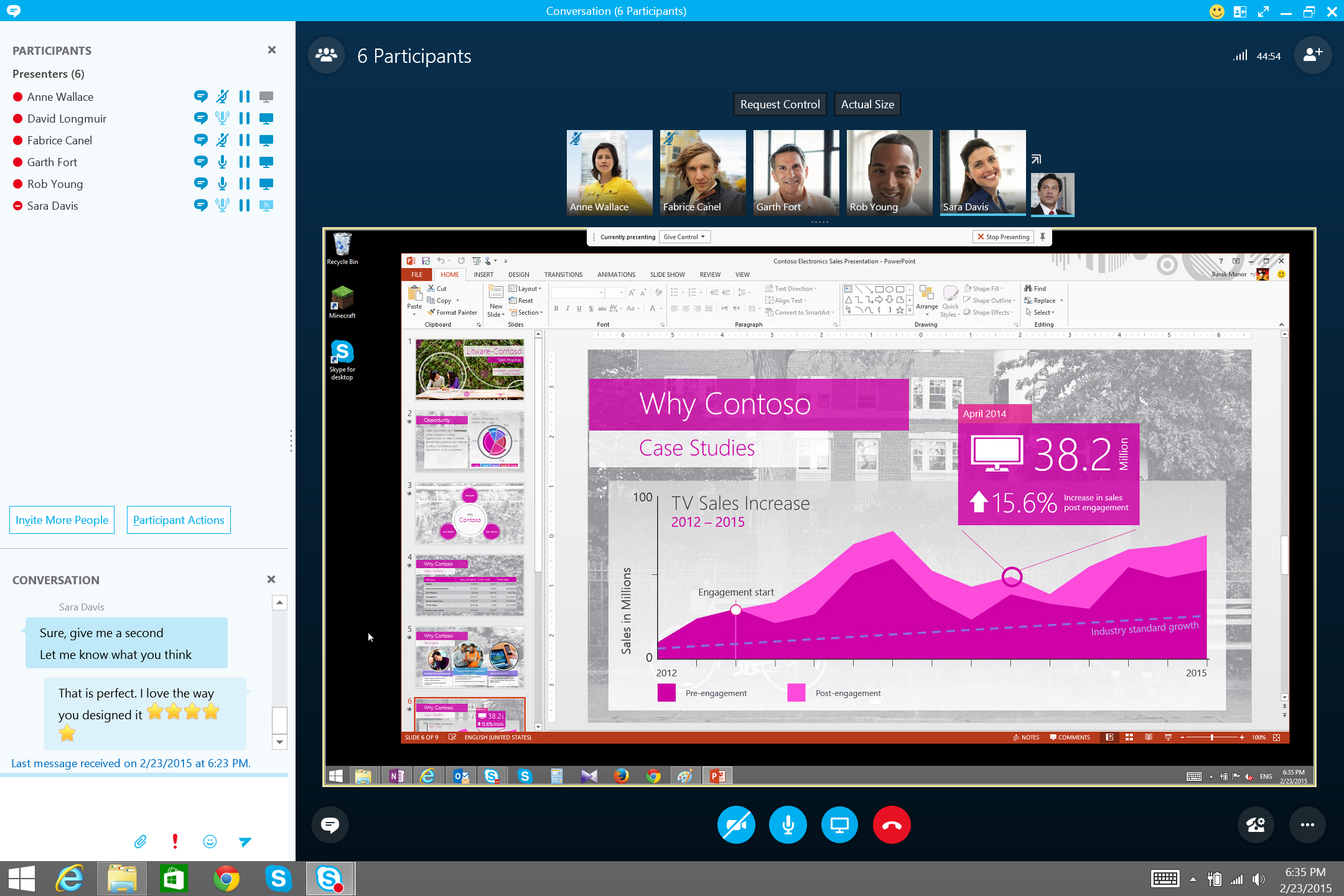
Video Conference merupakan salah satu fitur utama didalam Skype for Business baik online maupun on prime yang berguna  untuk menghubungkan sesama pengguna didalam satu ruang konferensi yang sama dan secara bersama-sama didalamnya untuk saling berkomunikasi dan bertukar informasi untuk kepentingan bisnis perusahaan. Video Conference Skype for Business Online memiliki kapabilitas sampai dengan 250 pengguna dalam satu ruang konferensi yang sama melalui perangkat desktop/laptop dan juga smartphone (IOS, Android, dan Windows Phone)

Video Conference Skype for Business dapat dilakukan diruangan meeting secara bersama-sama. Dengan menggunakan Logitech Video Collaboration dan salah satunya unitnya yaity Logitech Group solusi itu dapat terpecahkan. dengan harga yang sangat mudah terjangkau. Bahkan Logitech membuat room meeting atau Skype Room System untuk Video Conference Skype for Business yang diberi nama Logitech Smart Dock.


Video Conference Skype

Fitur - Fitur yang biasa digunakan untuk Video Conference Skype For Business :

1.       Presentasi Power Point

Fitur yang berguna untuk menampilkan materi presentasi berupa file powerpoint, sehingga memudahkan proses meeting pada saat konferensi, apabila didalamnya membutuhkan penyajian data - data tertentu dari proses bisnis yang sedang berjalan.

Video Conference Skype 
                                                                                                                                                 

2.        Remote Desktop

Merupakan salah satu fasilitas didalam Video Conference Skype for Business yang berguna untuk membantu permasalahan (troubleshoot) antar sesama pengguna, sehingga mereka dapat mengontrol komputer sesama secara real-time dengan mudah dan cepat.

Video Conference Skype

3.        Recording

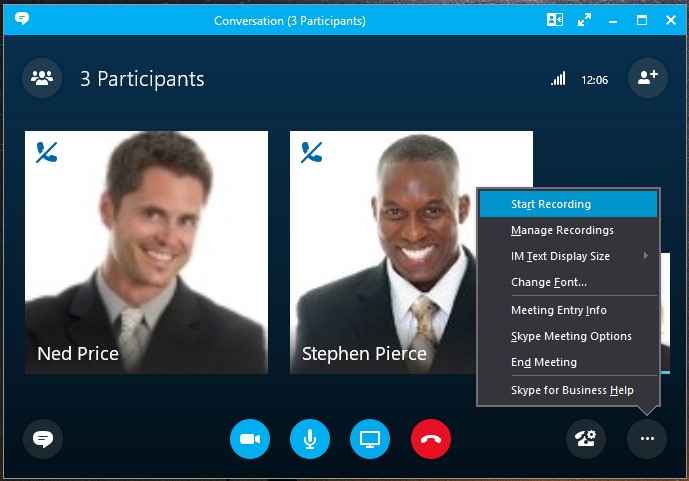
Salah satu fitur didalam Video Conference Skype for Business yang memungkinkan pengguna untuk merekam aktifitas konferensi meeting berjalan, sehingga dapat menjadi notulen meeting yang berguna bagi perusahaan.

Video Conference Skype for Business 


4.       Whiteboard

Salah satu fitur kolaborasi yang memungkinkan pengguna untuk dapat saling bersama – sama  dalam melakukan kolaborasi terhadap ide – ide yang dapat dituangkan diatas kanvas putih layaknya untuk menggambar didalam aplikasi Skype for Business.

 Video Conference Skype for Business


Senin, 25 April 2016

Microsoft Surface Hub

Microsoft Surface Hub


Jual Microsoft Surface Hub, Harga Microsoft Surface Hub
Microsoft Surface Hub, perangkat yang tengah dikembangkan Microsoft, ternyata tidak bisa dinikmati oleh peminatnya di tanggal yang semula disebut sebagai tanggal siapnya perangkat tersebut didistribusikan. Perangkat ini disebut mengalami penundaan sehingga baru bisa digunakan pada saat ini.
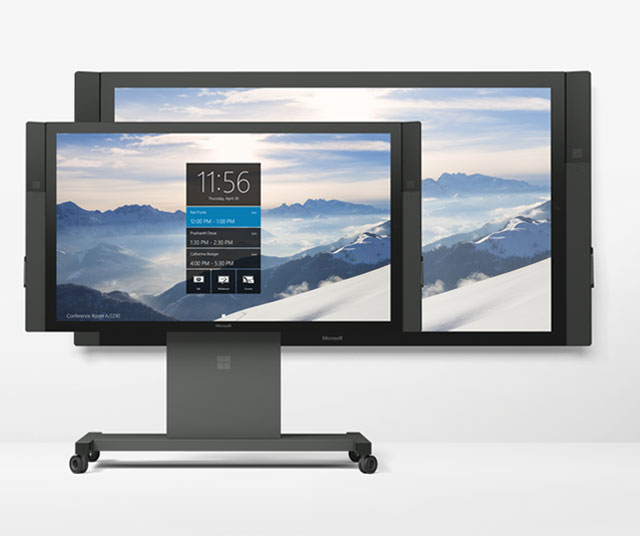
Pernah mendengar Microsoft Surface Hub? Melihat nama “Surface” di produk dari Microsoft, Anda pasti membayangkan perangkat tablet dari raksasa software tersebut. Ya, pada dasarnya, Microsoft Surface Hub memiliki fungsi yang mirip dengan tablet, tetapi Microsoft Surface Hub menggunakan layar besar, 55″ dan 84″! Perangkat ini lebih ditujukan untuk perusahaan yang memang membutuhkan perangkat dengan layar sentuh dalam ukuran besar untuk mendukung aktivitas mereka.
Jual Microsoft Surface Hub, Harga Microsoft Surface Hub
Microsoft Surface Hub berukuran layar hingga 55″ dan 84″ tentunya membuat perangkat ini bisa dimanfaatkan untuk menampilkan suatu tampilan tertentu yang butuh dibagi ke banyak orang dalam satu ruangan dengan mudah. Microsoft Surface Hub 55″ akan menggunakan prosesor Core i5, sementara Microsoft Surface Hub 84″ akan menggunakan Core i7. Microsoft memang tidak menggunakan panel layar sentuh berukuran besar untuk perangkat ini. Mereka akan menggunakan panel tambahan untuk memberikan lapiran peka sentuhan di layar yang digunakan.

Rabu, 13 April 2016

Polycom Trio 8800

Polycom Trio 8800


Jual Polycom Trio, Harga Polycom Trio


Polycom Trio 8800 hadir memberikan pengalaman kualiats audio terbaik untuk diruang meeting. Polycom Trio 8800 bukan hanya memberikan kualiatas audio yang menakjudkan akan tetapi memberikan collaboration visual yang dahulu dengan menggunakan biaya mahal.

Berikut komponen hardware untuk Polycom Trio 8800, terdiri dari audio conference / microphone speaker, Visual+ atau hub connection, dan Camera.

Feature Polycom Trio 8800 adalah sebagai berikut :
  • HD Voice dan eliminasi automatic noise back ground (Polycom Exclusice NoiseBlock)
  • Call handling, Security dan prpvisioning (H.264 AVC, High Profile, Lync Basic SVC)
  • Support USB (Wired), Bluetooth, NFC (wireless) dan IP
  • Dapat joint meeting dengan integrasi ke kalender
  • Open SIP, sangat baik untuk interoperability dengan Skype For Business, Microsoft Office 365 Cloud PBX, Ms. Lync 2013 dan RealPresence Platform
  • 360' Microphone dan 6 Meter dari Microphone dapat ditambahan extend microphone.
  • 5" LCD, Color Display, responsive, smooth
  • Secure WiFi dan Gigabit Ethernet. 
  • Support PoE

Polycom Trio 8800 menambahkan microphone jika dirasakan ruangan meetingnya besar, 


Polycom Trio 8800 hadir memberikan pengalaman kualitas audio conference untuk di ruang meeting anda.  360' Microphone dan 6 Meter dari Microphone dapat ditambahan extend microphone.


Selasa, 12 April 2016

Connecting Polycom Trio


Connecting Polycom Trio


Polycom Trio

Gambar diatas merupaka connection polycom trio.

Dimana Polycom Trio 8800 berhubungan dengan ke Hub Polycom Trio Visual+ dengan menggunakan media IP, yang perangkat keduanya support PoE. 

Pada Polycom Trio 8800 Audio Conference dapat ditambahan extend mic.

Dan pada Polycom Trio Visual+ untuk video conference dihubungkan ke display TV / Monitor dengan meggunakan kabel HDMI. dan menghubungkan USB ke Camera untuk mengambil gambar atau video.


AudioCodes SmartTAP Call Recording

AudioCodes SmartTAP Call Recording


AudioCodes SmartTAP Call Recording is an enterprise-wide compliance and liability recorder supporting Skype for Business. Though most recorders in the market focus on Contact Center features, SmartTAP is deployed across the enterprise to capture calls, either on-demand or, in some cases, full time, when calls about compliance and liability occur more frequently. With an integral Skype for Business recording toolbar, enterprise users can record with SmartTAP anywhere and any time they are on Skype for Business calls. SmartTAP can initially be deployed on a small scale and be scaled up to support many thousands of users using the product’s linear scalability feature.

SmartTAP Call Recording Solution

Features

  • Simple, easy-to-use centralized web-based management interface
  • Convenient Full Time or Record on Demand or Save on Demand options
  • Customizable Call Recording Announcements
  • Maintains all Skype for Business Calls within the Enterprise infrastructure
  • Embedded Skype for Business Client Toolbar
  • Pause & Resume recording for PCI Compliance
  • Robust Search and Playback allowing users to search, retrieve, download and email recordings
  • Distributed solution with branch survivability. Continue to record when WAN is down
  • Quality management with customizable and user definable evaluation forms and reports
  • Robust security with definable granular user security profiles
  • TDM and IP system integrations support hybrid communications environments
  • Support for industry-leading telephony systems such as Microsoft UC, Cisco, Avaya, Allworx, Shoretel and others

Benefits

  • Recording solution for compliance, liability, quality assurance, security and sales verification
  • Software based licensing for simple deployment and easy upgrades
  • Easily record anyone in the Enterprise including mobile or remote
  • Fully passive recording solution – no user interaction required
  • Powerful, intuitive management system simplifies recording and retrieval operations
  • Can be hosted on AudioCodes Mediant hardware platform reducing hardware costs and footprint
  • Widely deployed solution with successful 3rd party telephony solutions integration

Senin, 11 April 2016

AudioCodes CloudBond 365 Deployment


AudioCodes CloudBond 365 Deployment Scenarios

AudioCodes’ CloudBond 365 is a versatile appliance. Here are the most common migration use cases for Cloud PBX, leveraging CloudBond 365:

Single Site/HQ

From SMB up to 5,000 enterprise users, CloudBond 365 can be deployed as the main Skype for Business voice infrastructure, connecting to Office 365 or in a standalone mode. Leveraging the native capabilities of the Skype for Business server, CloudBond 365 can also be deployed in disaster recovery (all models) or full high availability modalities (CloudBond 365 Pro Box and Enterprise Box Editions only).

Branch Sites

Providing full survivability and local PSTN termination, CloudBond 365 is an ideal solution for obtaining maximum communications performance for remote branches. Whether it is connected to the main HQ Skype for Business server deployment or a partner-hosted platform, branch users can enjoy uninterrupted optimal service for all communications modalities, even in the case of a WAN failure.

Cloud PBX: Local PSTN Connectivity Hybrid Scenario

CloudBond 365 provides connectivity to the cloud on the one hand and to the PSTN on the other. It facilitates a simple migration with a hybrid approach, starting with only some users registered to the cloud and others registered to the on-premises CloudBond 365. CloudBond 365 can support the hybrid Cloud PBX – local PSTN connectivity scenario in a variety of ways including:
  • A greenfield deployment in which there was no prior implementation of a Lync/Skype for Business infrastructure and the company wants to migrate some, but not all of its users to the cloud
  • A full cloud deployment for headquarters users while remote branches use the local PSTN
  • An existing Lync/Skype for Business infrastructure where the customer may want to leave office users homed in the on-premises infrastructure for full PSTN and PBX capabilities but may also want to migrate information workers to Cloud PBX

CloudBond 365 Benefits and Features

  • Enables the migration to Skype for Business enterprise voice providing the option to have full PBX features or be homed in Cloud PBX
  • Offers a complete Skype for Business solution that integrates the connectivity and management tools in one package
  • Comes in different box edition sizes, as a virtualized appliance, or as a management pack and can adapt to different architectures and business models
  • Delivers special management interfaces for Office 365 and the corporate Active Directory, which automate the Hybrid or Cloud PBX connection
  • Supports new user management capability to simplify user policy management
  • Offers backup and restore support
  • Includes desk phone management capabilities

VoIP Gateway

VoIP Gateway


VoIP Gateway adalah Media yang menghubungkan antara perangkat jaringan berbasis IP baik itu SIP Server / IP PABX atau pun TDM PABX dengan jaringan PSTN.

Berikut contoh gambar media gateway yang berhubungan dengan Skype For Business, IP PBX, TDM PBX dengan jaringan PSTN, seperti gambar dibawah ini


Berikut contoh gambar implementasi VoIP Gateway pada jaringan WAN.
Dimana Media Gateway / VoIP Gateway berkomunikasi antar kantor pusat dan kantor cabang.
Jika akan menghubungi kantor cabang ke kantor pusat atau sebaiknya cukup dial extentionnya saja.
Dalam hal ini perusahan akan menghemat biaya operasional perusahaan terutama komunikasi.


Sabtu, 09 April 2016

AudioCodes Session Experience Manager (SEM) for Skype for Business

AudioCodes Session Experience Manager (SEM) for Skype for Business is an intelligent analysis tool designed to quickly detect, monitor and analyze the quality of Voice over IP calls within a Microsoft Skype for Business environment. It remediates real-time problems over a VoIP ecosystem comprising of Skype for Business and AudioCodes’ One Voice integrated solution.
Expanding on the ability to detect and correct all voice calls going through AudioCodes One Voice for Skype for Business offering (SBCs, Gateways, and IP Phones), the SEM now has visibility on all voice calls within the Microsoft Skype for Business environment, including Skype for Business to Skype for Business, Skype for Business to Federated, Skype for Business to remote workers, Skype for Business to Gateway/SBC, Skype for Business to mediation server.
Session Experience Manager (SEM) for Skype for Business
Skype for Business administrators have a network view which can show information about any call, originating internally or externally, in real time. SEM’s intuitive GUI offers a very fast drill down capability from the network view to specific calls anywhere on the network. Additionally, the capability for conducting an easy Root Cause Analysis for troubleshooting calls between the different Skype for Business servers (mediation, edge, etc.), provides administrators with the ability to pinpoint the precise location of the problem within the Microsoft Skype for Business environment. SEM provides alarms in real time which can be propagated via a variety of interfaces such as SNMP, email and SMS.

Features

  • SEM monitors and analyzes both Skype for Business and Audiocodes’ components as a complete solution
  • Probe-less software architecture. No need for additional hardware probes to monitor the full Skype for Business ecosystem
  • Encapsulate multiple Skype for Business front-end server voice traffic monitoring into a single view
  • SEM integrates with Audiocodes’ EMS to resolve detected problems
  • SEM for Skype for Business is part of AudioCodes comprehensive Microsoft Skype for Business portfolio providing a “one-stop-shop”
  • Active probes for pre/post deployment assessments can be added
  • Real time NOC and detailed calls statistics
  • Comprehensive user experience with easy drill down from network view to calls information details
  • Provides alarms on quality degradation as well as call control problems in real time

Benefits

  • Monitors and analyzes both Skype for Business and AudioCodes components as a complete solution
  • Probe-less s/w architecture. No need for additional h/w probes to monitor the full Skype for Business eco system
  • Integrates with AudioCodes’ EMS to resolve detected problems
  • Single vendor for all voice related expertise
  • Real time detailed call statistics
  • Multi-site network topology view
  • Comprehensive user experience with easy drill down from network view to call information details
  • Provides alarms on quality degradation in real time
  • Active probes for pre/post deployment assessments can be added

Kamis, 31 Maret 2016

AudioCodes MediaPack 1xx Analog Media Gateways

AudioCodes MediaPack 1xx Analog Media Gateways

Jual MediaPack 1xx Analog Media Gateways

AudioCodes MediaPack 1xx series of Analog VoIP Gateways are cost-effective, stand-alone VoIP gateways that provide superior voice technology for connecting legacy telephones, fax machines and PBX systems with IP telephony networks and IP-based PBX systems. The MediaPack 1xx series gateways support a wide variety of service provider and enterprise applications:
  • Service providers can use MediaPack gateways to connect Multi-Tenant Units (MTUs), IP Centrex subscribers, payphones, and rural users over wireless and satellite links
  • Enterprises can use MediaPack gateways to connect their legacy PBX systems over an IP infrastructure. In addition, in IP Centrex and central IP-PBX applications, MediaPack enhances remote location availability and provides Stand Alone Survivability (SAS) when there is no IP connection between branch locations and a central SIP server, SIP proxy or central IP-PBX
AudioCodes MediaPack 1xx gateways are fully interoperable with leading softswitches, SIP servers

Features AudioCodes MediaPack 1xx

  • Support for 2 to 24 analog ports
  • T.38 fax compliant
  • Rich subscriber feature set: 3-way conference with local mixing, call pickup, hunt groups, call forwarding, call hold and call transfer
  • Echo cancellation, jitter buffer, voice activity detection (VAD) and comfort noise generation (CNG)
  • Complies with MGCP, MEGACO and SIP control protocols

Benefits AudioCodes MediaPack 1xx

  • Leverage investment in existing analog telephone, modem, and fax systems – easing VoIP migration
  • Lifeline for fallback to PSTN for E911 (Emergency number PSTN breakthrough) or upon network/power failure (FXO and/or FXS configurations)
  • Standalone Survivability (SAS) keeps your business running in the event of a network failure

Specifications AudioCodes MediaPack 1xx


  MP-112 MP-114 & MP-118 MP-124D
Voice Ports 2 4/8 24
Telephone Interfaces FXS, RJ11 FXS, FXO,
or mixed FXS/FXO, RJ11
FXS, 50-pin Telco
Lifeline for E911
and network failures
- Supported -
Network Interface 10/100 BASE-TX, RJ45


Sabtu, 05 Maret 2016

Polycom VVX 600 Series Business Media Phones

Polycom VVX 600 Series Business Media Phones


Polycom VVX 600 Series Business Media Phones is premium Business Media phone delivering best-in-class desktop productivity for corporate executives and managers.


Enhance productivity and enrich collaboration with the ultimate, all-in-one, one-touch desktop UC solution designed specifically for executives, managers and knowledge workers. Polycom VVX 600 series business media phone delivers a best-in-class personal communications experience with an extensive list of easy-to-use features that complement the way you work. Polycom VVX 600 series is simple for administrators to deploy, maintain and upgrade while seamlessly integrating with third-party productivity applications. Leverage previous IT infrastructure investments and protect your investment into the future with options such as add-on video, wireless and other accessories.

Technical Polycom VVX 600 Series Business Media Phones

ar

  • Enhance executive productivity
    • Large (4.3”) TFT (480 x 272) capacitive touch-screen
    • Up to 16 line appearances/speed dials
    • Hard Keys: 12-key keypad, home, speaker, mute, volume, headset
    • Video playback and video conferencing via external USB cam
    • Integrated Bluetooth
  • Best-in-class personal communications
    • Legendary Polycom HD Voice technology up to 14KHz on all audio paths (Speaker, Handset, Headset) 
    • 2 x Ethernet 10/100/1000
    • 2 x USB 2.0 host
    • Green – low power
  • Simple to deploy and easy to administer, upgrade, and maintain
    • Plug and play provisioning with zero touch provisioning
    • Robust SIP feature stack
  • Easy integration with third-party UC and productivity applications
    • Complete API tooklit for custom development
    • Full Browser (Webkit)
  • Get the most from your investments
    • Broad accessory support (Expansion Modules, Video camera accessory)
    • Microsoft Lync interoperability

Polycom VVX 300 Series Business Media Phones

Polycom VVX 300 Series Business Media Phones

Jual Polycom VVX 300 Series Business Media Phones

Polycom VVX 300 Series Business Media Phones powerful entry-level Business Media phone for today's cubicle workers


These powerful 6-line entry-level Business Media Phones are for today's cubicle workers that handle a low to moderate volume of calls and need crystal clear communications.
Give your cubicle worker the best experience with this high quality UC Business Media Phone. Designed for a broad range of environments for small and medium businesses.
  • Make more efficient and productive calls with the unparalleled voice clarity of Polycom HD Voice
  • Improve productivity for cubicle worker’s and call center operators through an intuitive easy to use user interface
  • Reduce deployment and maintenance costs—the Polycom Zero Touch Provisioning and web based configuration tool makes the VVX 300 series simple to deploy, easy to administer, upgrade, and maintain
  • Leverage previous IT infrastructure investments—deploy VVX 300 series business media phones on your existing network without needing to upgrade your call control platform
  • Easily to integrate with third- party web-based UC and productivity applications for broad, standards based, open APIs

Technical Polycom VVX 300 Series Business Media Phones


Jual Polycom VVX 300 Series Business Media Phones
  • Backlit grayscale graphical LCD (208 x 104)
  • 6 line or speed dial keys
  • HD Voice up to 7KHz on all audio paths (Speaker, Handset, Headset) 
  • 2 x Ethernet 10/100 or GigE (VVX 310)
  • Asian character support
  • Hard Keys: 12-key dial pad, home, speaker, mute, headset, volume, messages, hold, transfer
  • 4-way navigation cluster with center "select" key
  • Supports VVX Expansion Module and VVX Color Expansion Module (Expandability up to 3 modules)